
We are happy to announce that we have just released Cordova Android 15.0.0! This is one of Cordova's supported platforms for building Android applications.
To upgrade:
cordova platform remove android
cordova platform add android@15.0.0
To install:
cordova platform add android@15.0.0
Release Highlights
BREAKING CHANGES
-
Increased Target SDK
This release has increased the target SDK to 36 (Android 15).
-
Project Dependencies
The following Gradle dependencies were bumpped:
- Gradle:
8.14.2 - Android Gradle Plugin (AGP):
8.10.1
Additionally, the following libraries have been upgraded:
- AndroidX App Compat -
1.7.1 - AndroidX WebKit -
1.14.0
If you or a plugin has made changes to any of the following configuration preferences, the build results might not match the expected outcomes with this release:
Preference Default Value android-minSdkVersion24 android-maxSdkVersionNot set android-targetSdkVersion36 android-compileSdkVersionandroid-targetSdkVersion configured value android-buildToolsVersion36.0.0 GradleVersion8.14.2 AndroidGradlePluginVersion8.10.1 GradlePluginKotlinVersion2.1.21 AndroidXAppCompatVersion1.7.1 AndroidXWebKitVersion1.14.0 GradlePluginGoogleServicesVersion4.4.2 Please take note of the versions that have been updated in this release. If you have manually modified any of these values, it is recommended to review and update the preference values accordingly.
- Gradle:
-
Increased Android Studio Requirement
With the increase of Android Gradle Plugin, "Android Studio Meerkat Feature Drop" is the minimum required version for building and running projects in Android Studio. This aligns with the Android Gradle plugin and Android Studio compatibility documentation.
Newer version of Android Studio are available but comes with untested version of Gradle. It is recommended to run
cordova build androidafter adding the platform and before opening the project in Android Studio to ensure that the project sets up a supported version of Gradle. -
Required Build Tools
To use
cordova-android@15.0.0, SDK Platform36and SDK Build Tools36.0.0must be installed. Older build tools version can be uninstalled if older versions of cordova-android is no longer used in any of your projects.Upgrade with Command-line tools:
The recommended way to install SDK Platform 36 and SDK Build Tools 36.0.0 is by using
sdkmanager, which is part of Android's Command-line tools package. The command-line tools is useful as it does not require Android Studio.At the time of writing, version 20 of the Command-line tools was downloaded from Android Studio's SDK Manager and used. It can also be downloaded from the Android Developers website.
sdkmanager 'build-tools;36.0.0' 'platforms;android-36'You may need to run the
updateflag first:sdkmanager --updateUpgrade with Android Studio:
To install SDK Platform 36:
- Open Android Studio's SDK Manager:
- Click on
SDK Platformstab - Check
Android 16.0 ("Baklava")which has theAPI Levelof36 - Click
Apply
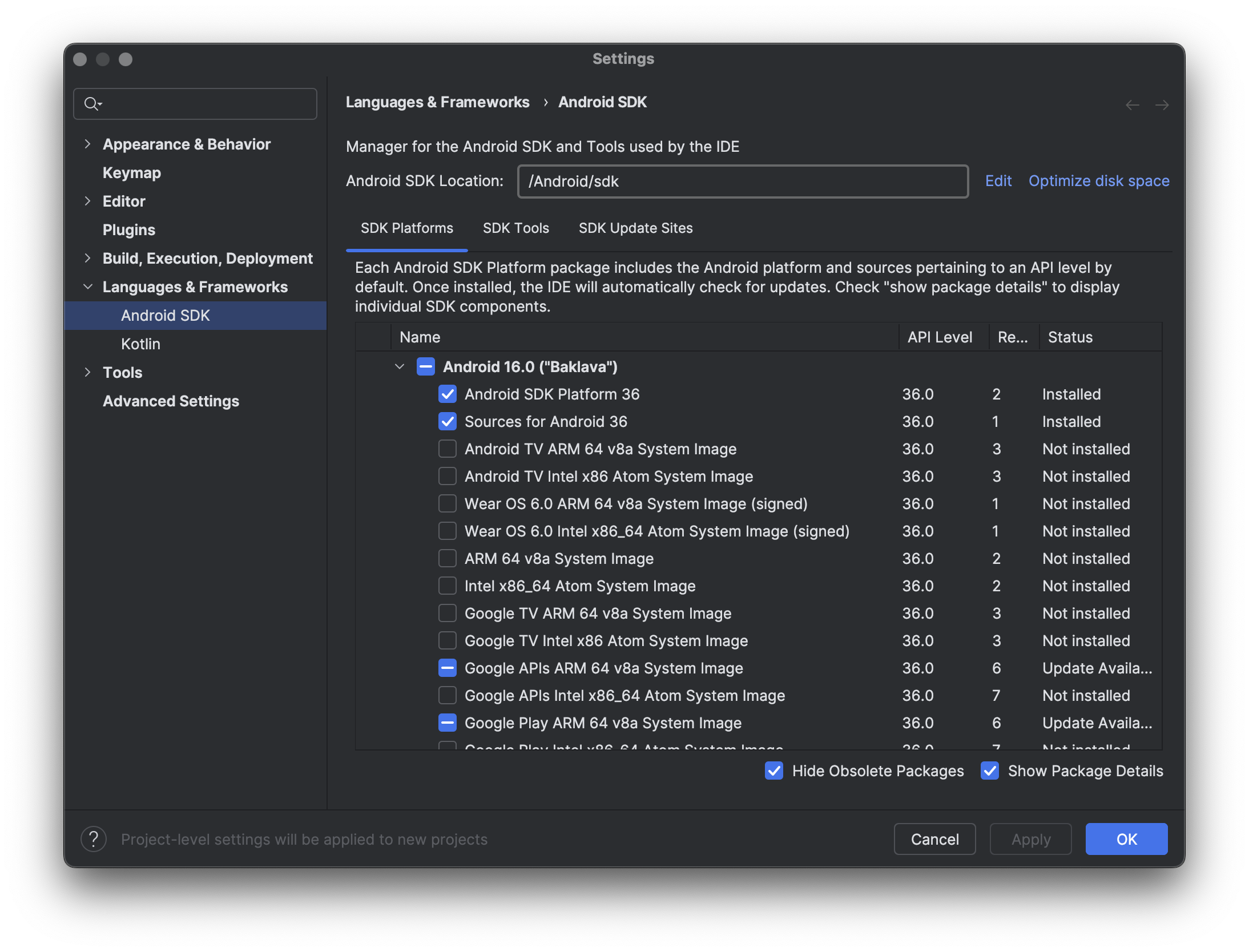
To install SDK Build Tools 36.0.0:
- Open Android Studio's SDK Manager:
- Click on
SDK Toolstab - Check
Show Package Details - Expand
Android SDK Build-Tools - Check
36.0.0 - Click
Apply
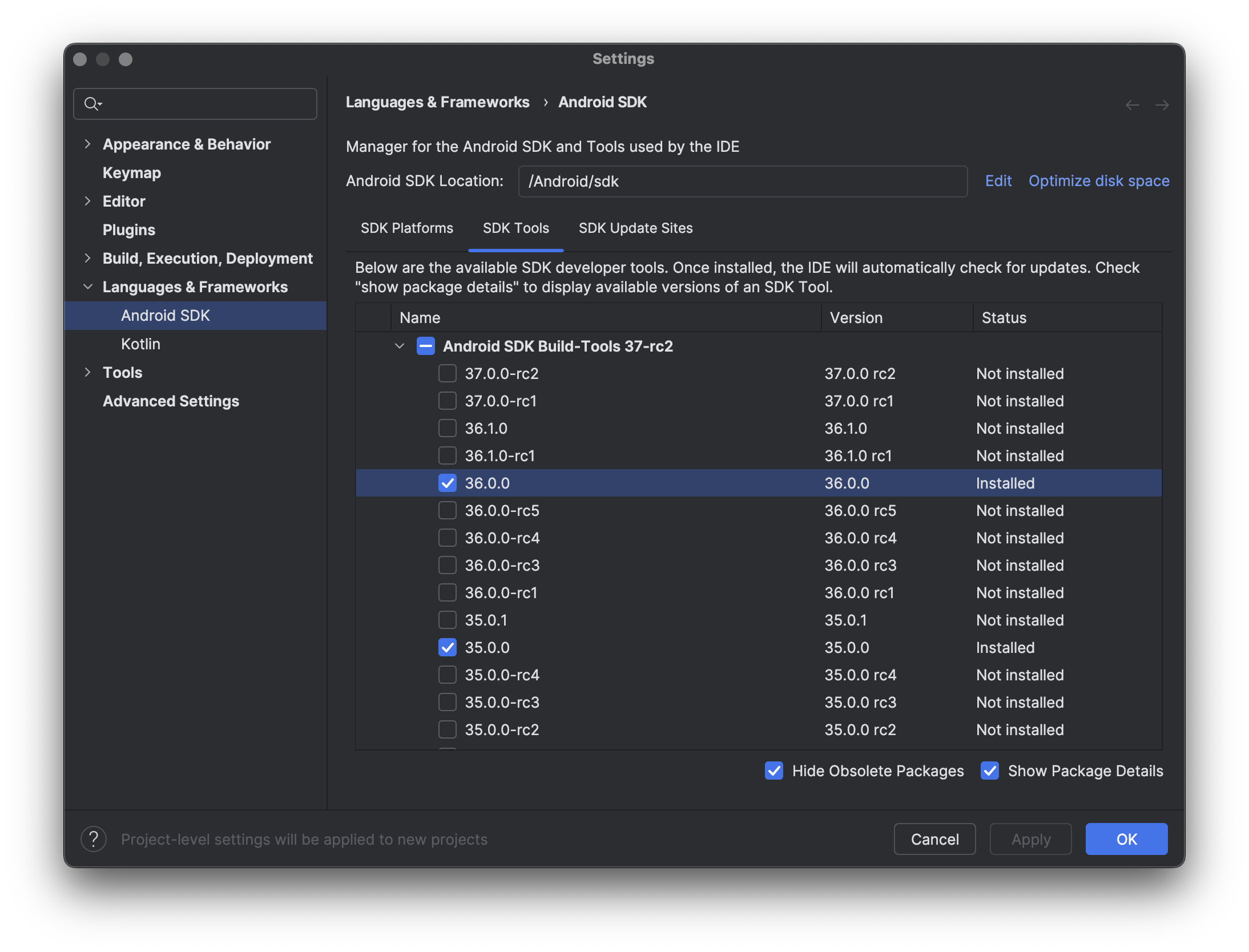
-
Increased Node.js Engine Requirement
The Node.js engine requirement in this release has been increased to version 20.17.0 or later.
-
Support Previous Non-Edge-to-Edge Functionality
By default, Android 16 enforces Edge-to-Edge with no way to disable it.
In this major release, Apache Cordova has improved the system bar functionality to mimic the previous non-Edge-to-Edge behavior, allowing app developers to continue supporting a status bar.
Users can still opt in to the Edge-to-Edge feature by using the
AndroidEdgeToEdgepreference flag introduced in Cordova-Android 14.IMPORTANT NOTE: The StatusBar plugin is no longer required. Status bar functionality has been integrated as an internal plugin to maintain the original behavior. The StatusBar JavaScript API is available:
-
window.statusbar.visible— A property that controls the visibility of the status bar. It accepts a boolean value (trueorfalse). -
window.statusbar.setBackgroundColor('#AARRGGBB')— A method that changes the background color of the status bar. It accepts a hexadecimal color string.
Previous status bar preferences are reused. Preferences are read in the following priority order:
StatusBarBackgroundColorBackgroundColor- Depending on the OS version, the
BackgroundColorpreference may also change the navigation/gesture bar.
- Depending on the OS version, the
-
-
Support Night & Day Theme
Added partial support for automatically switching between night and day themes based on system settings when SplashScreen, StatusBar, or background-related preferences are not set.
Fixes
-
Back button override on API 36+
Resolved an issue where Android API 36 crashes when the hardware back button is pressed.
-
Apply
repositories.gradleforcordova.gradledependenciesResolved an issue where users were unable to override repository settings for build-related Gradle dependencies.
-
Handle uninstalling multiple plugin assets
Resolved an issue where plugins with multiple defined
<assets>were not removed properly during uninstall.
Changes include:
Breaking Changes:
- feat!: support previous non-E2E (#1817) [76aa9380]
- feat!: add partial night & day theme support (#1818) [60d28420]
- feat!: bump kotlin@2.1.21 (#1814) [72e71488]
- feat!: bump Gradle@8.14.2 & AGP@8.10.1 (#1811) [c25ed278]
- feat!: bump sdk & build tools to 36 (#1810) [d8f6f377]
- feat!: remove unused getASPath.bat file (#1808) [7a47fe01]
- chore!: bump dependencies & update node engine requirement (#1887) [b4eadcce]
- chore!: update dependencies (#1843) [488c4987]
- chore!: update template defaults (#1837) [e4457f7f]
- chore(npm)!: bump cordova-common@6.0.0 w/ rebuilt package-lock.json (#1835) [8742cfe4]
Features:
- feat: Allows additional settings to be included on settings.gradle (#1819) [5bca218e]
- feat: replace nyc with c8 (#1844) [7d7f5110]
- feat: allow disabling splash screen for embedded Cordova (#1824) [c2cf589d]
- feat: AndroidShowDeprecations preference flag (#1822) [0190d2e3]
- feat: androidx.appcompat:appcompat@1.7.1 (#1813) [36bee664]
- feat: androidx.webkit:webkit@1.14.0 (#1812) [4dcfc361]
- feat(CallbackContext): add success method for boolean (#1864) [6b76757c]
Fixes:
- fix: Potential NPE when handling generic exceptions (#1878) [7a353fe8]
- fix: opaque navigation bar in edge to edge (#1867) [eaca570c]
- fix: cordova requirements command and SDK lookup based on tools (#1877) [76bac55f]
- fix: re-expose and support pollOnce (#1854) [655aa0a5]
- fix: edge to edge/fullscreen margins (#1847) [360be21e]
- fix: Deprecation warning in PluginManager for using Class.newInstance (#1823) [eb5fe4fb]
- fix: Back button override on API 36+ (#1831) [46af3114]
- fix: gradle deprecation warnings about property assignment (#1821) [df36c7a2]
- fix: replace deprecated fs.F_OK with fs.constants.F_OK (#1820) [b7923261]
- fix: apply repositories.gradle for cordova.gradle dependencies (#1816) [cab5c5b7]
- fix(plugins): remove from platformWWW by default (#1807) [f0e88856]
- fix(plugins): rename & match removeFileF logic with other platforms (#1806) [5dc9c728]
- fix(plugins): handle uninstalling multiple plugin assets (#1805) [08b8a954]
- fix(statusbar): inject script block to compute color & replace padStart w/ logic supported on SDK 24 (#1853) [52578ae7]
- fix(windows): Escape back-slashes for gradle config jdk path (#1876) [fb562f4e]
Chores:
- chore: add license header to template gitignore (#1893) [ffa77cad]
- chore: update RELEASENOTES.md (#1892) [5003275b]
- chore: license, license headers & CI & draft workflow improvements (#1891) [d426e0ff]
- chore: update changelog (#1890) [aaf46bb2]
- chore(ci): get npm package filename from json output (#1889) [7fbdee1e]
- chore: minor changes to DEVELOPMENT.md (#1884) [edf34400]
- chore: add DEVELOPMENT.md & cleanup README.md (#1883) [31364a97]
- chore: update release audit workflow & license headers (#1870) [d7afba0a]
- chore: bump 15.0.0-dev (#1803) [00744c4f]
- chore: bump version 14.0.2-dev [872d9887]
- chore(ci): draft release (#1882) [347e2add]
- chore(deps-dev): bump js-yaml from 4.1.0 to 4.1.1 (#1869) [ebe6890d]
- chore(deps-dev): bump tmp from 0.2.3 to 0.2.4 (#1834) [af1ae68a]
- chore(deps): bump lodash from 4.17.21 to 4.17.23 (#1879) [2ea3a731]
- chore(deps): bump glob from 10.4.5 to 10.5.0 (#1868) [172b8448]
- chore(readme): added nightly build section (#1873) [eaf875b0]
Other:
- ci: use macos-15 (#1829) [1204a793]
- ci: update workflow - added node 24, permission scoping & codecov pinning (#1804) [60244658]
- ci(release-audit): use latest apache-rat-action (#1809) [6b8e819f]
- ci(workflow): update release-audit & license config (#1828) [bf0ba3dd]
- dep(npm): bump @cordova/eslint-config@6.0.0 (#1830) [56afb708]
- doc(readme): update github and npm version badges (#1872) [8c8fbc9a]
- test(plugins): remove old deprecated android_studio option (#1815) [484c60e4]